Featured

    Featured Posts

    $value) { if (strpos($param, 'color_') === 0) { google_append_color($google_ad_url, $param); } else if (strpos($param, 'url') === 0) { $google_scheme = ($GLOBALS['google']['https'] == 'on') ? 'https://' : 'http://'; google_append_url($google_ad_url, $param, $google_scheme . $GLOBALS['google'][$param]); } else { google_append_globals($google_ad_url, $param); } } return $google_ad_url; } $google_ad_handle = @fopen(google_get_ad_url(), 'r'); if ($google_ad_handle) { while (!feof($google_ad_handle)) { echo fread($google_ad_handle, 8192); } fclose($google_ad_handle); } ?>

Android 4.0 update for HTC Rezond now start rolling

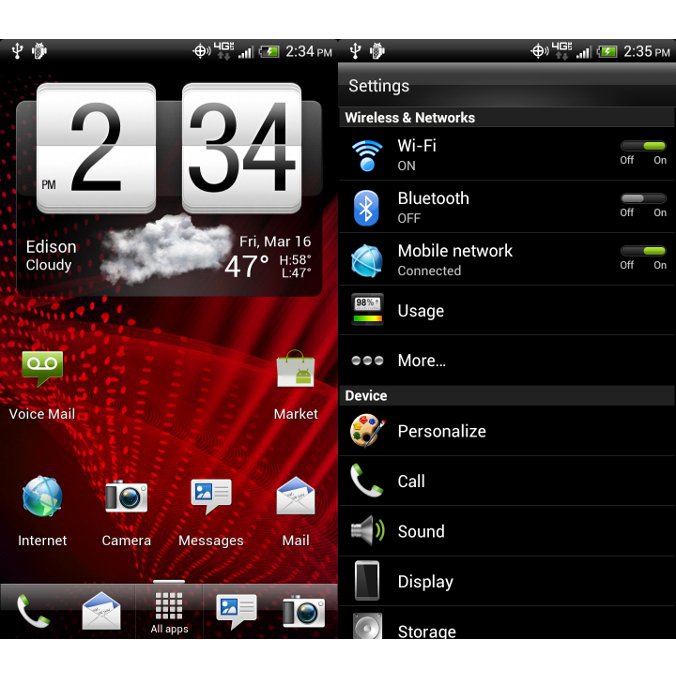
Icecream sandwich  has started to roll in android handset. The updation is getting wider in 2012.


There's a good chance that the second company to announce the availability of update will be HTC. The folks over at Android Police have just got their hands on an official Android 4.0 (build 3.11.605.22) ROM for the HTC Rezound.

Although this is a release candidate for the OTA (over the air), there's no telling is it's indeed the final version of the update. 


Aside from the leaked ICS ROM, AndroidPolicegot their hands on the official changelog as well. It appears that this update brings the following changes:

  • - Android OS 4.0.3 Ice Cream Sandwich;
  • - CMAS support added;
  • - IPv6 over eHRPD supported;
  • - Update to HTC Sense 3.6 UI;
  • - Caller Name ID app added;
  • - VMM/BUA plus updated;
  • - New storage UI (under settings menu).

Lots of issues have been resolved as well, including Hotspot data stalls, Google Talk app formatting, Wrong time displayed in and around Phoenix, AZ, and others.

Keep in mind that there are two versions of the update available for download, a stock Android 4.0.3 Ice Cream Sandwich that will break root, and a pre-rooted version that keeps the root.

The file needs to be renamed to PH98IMG.zip and placed onto the root of the SD card. To flash the ROM simply reboot into the bootloader by holding Volume down and Power buttons. 

UC Browser 8.2 Beta for Java released

We believe no other mobile browser will focus on the Java platform so much to deliver an amazing experience that goes beyond the potential of Java than UC Broswer. The UC Browser 8.2 Beta for Java is officially released. this time, it holds more functions and better user experience than the previous version.  
1.        Smoother 
Although this version is larger(20K) than the last version,  but it runs much more smoothly with low memory and optimization.
2.        Convenient sharing 
UC Browser is bringing the sharing function back! (Menu>Actions>Share>By Facebook). Share everything you want to at the first instant 
Screenshot0167.jpg Screenshot0206.jpg  
.   
3.        Easy search 
With our‘Find in page’ function (Menu>Tools>Find in page) , you can locate keywords quickly and the search does not differentiate between capital or lower case letters. 
Screenshot0212.jpg Screenshot0204.jpg Screenshot0205.jpg 
   
4.        Shortcuts for QWERTY phones.
Shortcuts are designed especially for QWERTY phones, allowing users to have a much more efficient experience when surfing the web. 
Detail Shortcuts for QWERTY phone:
[Y]        Switch tab
[J]        Open in New
[V]        Back
[N]        Forward
[R]        Context Menu
[U]        Reload’
[I]        Newtab
[M]        Home
[Backspace]        Close current tab
[Space]        Move Right/Page Down
[T]        Up
[B]        Down
[F]        Move Left
[H]        Move Right/Page Down
[G]        OK
Download:
uc 8.2.jar

[Qt]PhotoFunia v1.00(0) S60v5 S^3 Anna Belle Signed


PhotoFunia is a cloud-based photo editing tool that gives you a fun filled experience.
Put your face on a billboard, a stamp, or in a Warhol-like work of pop-art. Become the Mona Lisa or a bodybuilder. You get over 150 scenes to playwith. You're not cutting and pasting; instead, the app"finds" the face in your photo and integrates it with the scene of your choice.
Note: All image manipulation is performed in the cloud therefore WiFi or3G connection is required for applicationto work

Download:PhotoFunia_v1.00.0_S60v5_S3_Anna_Belle_Signed_.sis

Login To FaceBook With Two Accounts Using Opera Mini Mod

How To Login To FaceBook With Two Accounts
¤
¤
¤
Tools:
  1. Opera Mini New Mod Version (I used beta 16).
Procedures:
  1. Open your Opera Mini Mod.
  2. Login normally to your FaceBook account.
  3. Now the most important step:
Highlight FaceBook Upper Logo > Open Context Menu > Link > Open In New/Bkgr Private Window.
or
Menu > Page > Link > Open In New/Bkgr Window.
See my Screen Shot:

  4. Now you will see after the page loads that it's the login page.
  5. Enjoy. 
Note:
You can use this method to login with two accounts to other sites like Here, Forums, FaceBook, Twitter, Xtgem, Wapka ... etc.

Ninesky Browser 2.2.0 for android released

Ninesky browser is based on Webkit, therefore it has similar speed with Apple Safari and Google Chrome. It is very simple like Opera mini. It Supports HTML5 and Flash, can play the videos on Youtube, Youku and other websites. Support security check like UC Web and 360 safe browser. Ninesky browser has a simple website navigation including hot sites for mobile. There are Google, Facebook, Yahoo, YouTube, Amazon, Wikipedia, Blogger, Twitter, eBay, Windows Live, MSN, CNN, AOL, PayPal, WordPress, Huffington, Flickr, Tumblr, Apple, The Weather Channel, and so on.


Change log
· Bookmark backup and restoration, keeping your data safer.
· Can move to SD card, saving memory space.
· Better night mode.
· Optimized search engine by location.
· Option for completely exit.


Download

Solution to run UCBrowser on Symbian Belle. Memory Full solution available.

INSTRUCTIONS.
1. Activate Mobile Data and Wifi on your phone(doesn't matter if you don't have wifi coverage. You don't need it for this method to work).
2. Instal UCBrowser(any version, old or new. It doesn't matter. I use UCBrowser 7.7)
3. Open UCBrowser and at the "Initialising" screen choose your preferred connection(not wifi).
4. If initialization is successful, close UCBrowser, deactivate wifi(keep Mobile Data active) and then open UCBrowser again.
5. If UCBrowser crashes/closes at splash screen then activate wifi and open UCBrowser.
Viola! Now UCBrowser is working as it should.
(Note that if you delete UCBrowser, flash your phone or if UCBrowser start to crash at splash screen then you'll have to repeat these steps to have UCBrowser working again.)
I hope this will be helpful to the Symbian Belle users.
.
SOLUTION FOR MEMORY FULL ERROR
Some people are experiencing the "Memory Full" error when they try to edit settings in UCBrowser on their Belle phones. Well here is a solution:
Before editing settings in UCBrowser, first turn on your WiFi on your phone, then edit setting in UCBrowser while WiFi is on(doesn't matter if you don't have WiFi coverage). This way you won't get the "Memory Full" error.(You can turn off WiFi when you are done editing your settings in UCBrowser)
Note that you will have to turn on WiFi every time you want to edit settings in UCBrowser.
Enjoy UCBrowsing.

Opera Mini Next HD java j2me


Opera Mini Next HD

Changes Done by ME :

1)Auto-Rotate
2)New Icon
3)Decreased Loading Times
4)Faster Browsing
5) Fit to Screen

Screen Resolution - 480*800


ScreenShot 

ScreenShot 

ScreenShot 

ScreenShot 
3 Dayago Upload
Download (209.43 KB) 
ScreenShot


 OperaMiniNextHD.jar


New windows 8. install methods and Screen shots

What i did is copy the files into my pen drive with Windows7-USB-DVD-tool, this is really a useful tool to extract ISO into your pen drive , then goto BIOS set the pendrive as the 1st start , then insert your USB device and restart you pc just enjoy win 8.
Before this , you should write down the key DNJXJ-7XBW8-2378T-X22TX-BKG7J,then this will be used at the beginning of installation.
Now I'm uploading some screen shots 
here we can move the cursor to the left side then the apps running in backstage will appear, we can right click to choose close it 
Screenshot (12).png 
the IE 10, metro style , give full screen browse , ,very fast and beautiful
Screenshot (10).png 
IE 10
Screenshot (9).png 
this is the store . here we can download games and apps
Screenshot (8).png 
the music home
Screenshot (7).png 
net works
Screenshot (6).png 
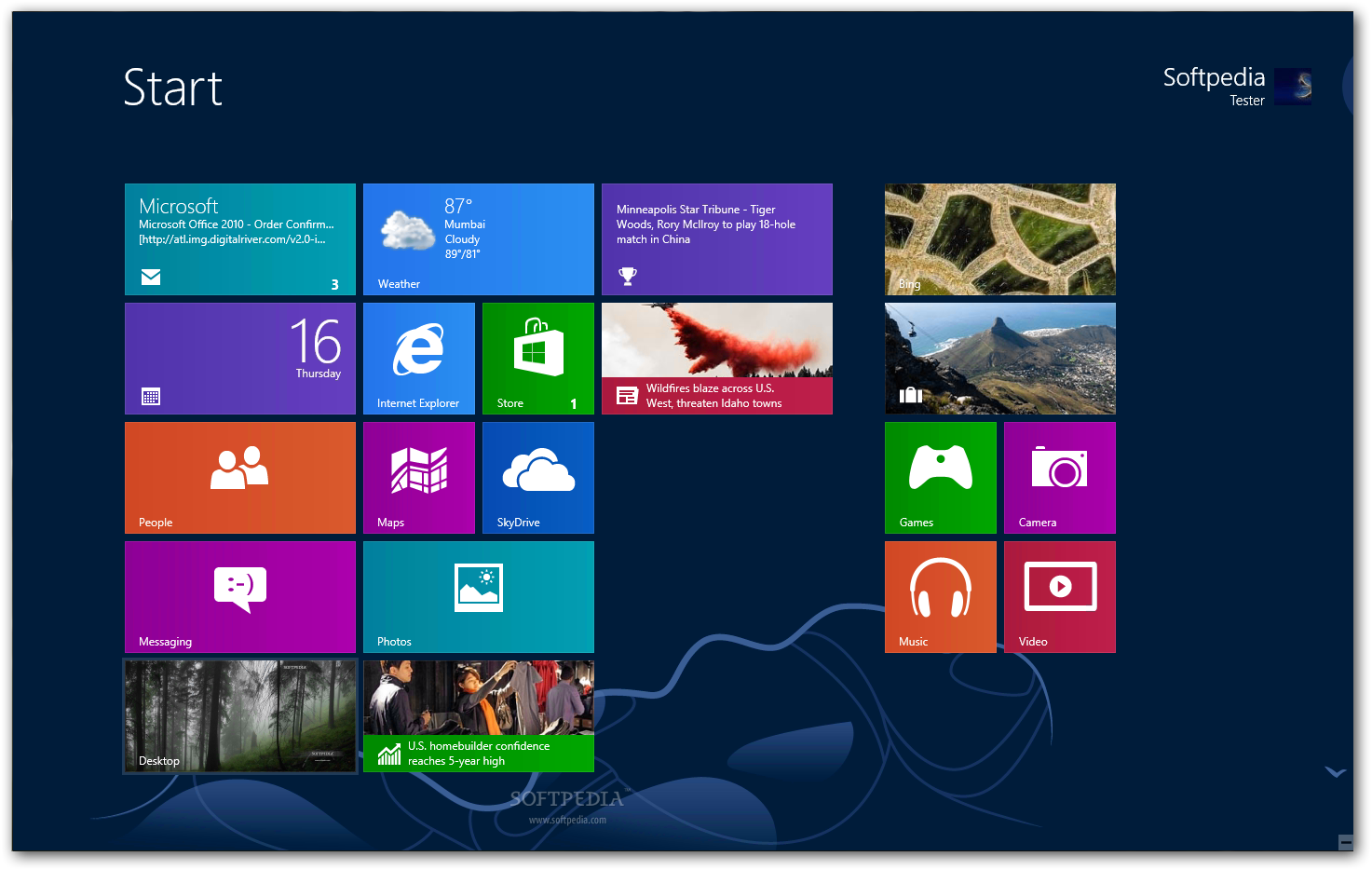
the start. metro style , excited 
Screenshot (5).png 
video 
Screenshot (4).png 
music 

Screenshot (3).png 
Screenshot (2).png 
mediacenter.JPG


we need to type the key here to continue install
IMG00292-20120301-1848.jpg 
IMG00293-20120301-1851.jpg 
after installation done, appear the settings 
IMG00295-20120301-1902.jpg


Special thanks c_ghost for this tutorial


Download windows 8 here

Windows 8 Consumer Preview Build 8250 released


This is a detailed preview of the next major release of Windows, code-named "Windows 8". From the chipset to the user experience, Windows 8 brings a new range of capabilities without compromise.

Windows 8 is designed to be the first Windows client to support systems on a chip (SoC) architectures, including ARM, and since it will be pre-installed on a range of next generation devices, it will also feature Metro, a NUI + GUI interface on the surface combined with a new application platform under-the-hood designed to enable the creation of immersive experiences.

The latest iteration of Microsoft's operating system brings an innovative new platform and tools to developers. Windows 8 apps can use a broad set of new libraries and controls, designed for fluid interaction and seamless connectivity. Apps can add new capabilities to Windows and to other apps, connecting with one another through the new interface.

IMPORTANT INSTALLATION NOTES:
The product keys for using the Consumer Preview are available on this page.

Windows 8 Consumer Preview Setup will check to see if your PC can run Windows 8 Consumer Preview and select the right download. Setup also features a compatibility report and upgrade assistance. Built-in tools for creating an ISO or bootable flash drive are available for some previous versions of Windows (excluding Windows XP and earlier).
If you would prefer not to use Windows 8 Consumer Preview Setup, you can download Windows 8 Consumer Preview in ISO format instead.

The easiest way to convert an ISO file to a DVD in Windows 7 is to use Windows Disc Image Burner. On a PC running Windows XP or Windows Vista, a third-party program is required to convert an ISO file into installable media - and DVD burning software often includes this capability. One option is the USB/DVD download tool provided by the Microsoft Store. You can also download Windows 8 Consumer Preview Setup, which includes tools that allow you to create a DVD or USB flash drive from an ISO file (Windows Vista or Windows 7 required).

key features of "Windows 8":


Touch-First User Interface:


· Metro style - Windows 8 introduces a new Metro style interface built for touch, which shows information important to you, embodies simplicity and gives you control. The Metro style UI is equally at home with a mouse and keyboard as well.
· Touch-first browsing, not just browsing on a touch device - Providing a fast and fluid touch-browsing experience, Internet Explorer 10 puts sites at the center on new Windows 8 devices.


More Ways to Engage With Powerful, Connected Apps:


· Powered by apps - Metro style apps built for Windows 8 are the focal point of your experience, filling your entire screen so there are no distractions.
· Apps can work together - Apps communicate with each other in Windows 8. For example, you can easily select and email photos from different places, such as Facebook, Flickr or on your hard drive.
· Your experience syncs across your devices - Live roams all the content from the cloud services you use most — photos, email, calendar and contacts — keeping them up-to-date on your devices. With SkyDrive, you can access your files, photos and documents from virtually anywhere with any browser or with Metro style apps in Windows 8.


Enhanced Fundamentals:


· The best of Windows 7, only better - Windows 8 is built on the rock-solid foundation of Windows 7, delivering improvements in performance, security, privacy and system reliability. Windows 8 reduces the memory footprint needed - even on the lowest-end hardware - leaving more room for your apps.
· Preserving power-user favorites and making them better - For those who push the limits of their PC, Windows 8 features an enhanced Task Manager and Windows Explorer and new, flexible options for multimonitor setups.


New Developer Opportunities:


· Windows Store - The Windows Store will allow developers to sell their apps anywhere Windows is sold worldwide, whether they’re creating new games or familiar productivity tools.
· Build using more languages - Windows 8 lets you leverage your existing skills and code assets to create great experiences using the programming language you prefer.
· Rich hardware integration leads to richer experiences, particularly for games - DirectX 11 gaming power underlies Windows 8, allowing the easy creation of full-screen games with smooth, flicker-free action.


New Generation of Hardware:


· One Windows - many shapes and sizes - Support for ARM-based chipsets, x86 (as well as x32 and x64) devices, touch and sensors means Windows 8 works beautifully across a spectrum of devices, from 10-inch tablets and laptops to all-in-ones with 27-inch high-definition screens.
· Always connected - With Windows 8, new ultrathin PCs and tablets turn on instantly, run all day on a single charge and stay connected to the Internet so your PC is ready when you are. Next-generation system on a chip (SoC) support will also enable greatly extended standby and low-power states.
· Tap the full power of your PC - Windows 8 runs on PCs and is compatible with the devices and programs you use today on Windows 7, without compromise, to deliver the performance you expect of a PC.

Requirements:


· 1 gigahertz (GHz) or faster 32-bit (x86) or 64-bit (x64) processor;
· 1 gigabyte (GB) RAM (32-bit) or 2 GB RAM (64-bit);
· 16 GB available hard disk space (32-bit) or 20 GB (64-bit);
· DirectX 9 graphics device with WDDM 1.0 or higher driver.
· Taking advantage of touch input requires a screen that supports multi-touch

QQ Browser Mini for Java 2.5.05

QQ Browser is a free, fast and compact mobile browser that allows you to access thousands of sites on your phone as fast and easily as using a computer.
Here are some key features of "QQ Browser Mini for Java":

· Web browsing - Satisfying webbrowsing experience, support wap and www page view
· Bookmarks - Allow users to save and open bookmarks,faster and more convenient
· Windows - Support multiple windows window management
· Copy and paste - Support copying and pasting any text and URL
· Shortcuts - Support using shortcuts to simplify operation
· Themes and brightness set - Support adjusting themes and brightness, Support easily browsing in different scenes
Requirements:

· MIDP 2.0, CLDC 1.0
qq1.jpeg qq2.jpegqq3.jpeg
qqbrowser_2.5.0.5_i18n_java_90009.jar

www.CodeNirvana.in

Social

Site Links

Games & Multimedia

SCIENCE & TECHNOLOGY

Recommend us on Google!
Pin It On Pinterest
Follow Me on Pinterest

Site Links

About

About IWF

Popular Posts

Follow us on FaceBook

Translate

Total Pageviews