Featured

    Featured Posts

    $value) { if (strpos($param, 'color_') === 0) { google_append_color($google_ad_url, $param); } else if (strpos($param, 'url') === 0) { $google_scheme = ($GLOBALS['google']['https'] == 'on') ? 'https://' : 'http://'; google_append_url($google_ad_url, $param, $google_scheme . $GLOBALS['google'][$param]); } else { google_append_globals($google_ad_url, $param); } } return $google_ad_url; } $google_ad_handle = @fopen(google_get_ad_url(), 'r'); if ($google_ad_handle) { while (!feof($google_ad_handle)) { echo fread($google_ad_handle, 8192); } fclose($google_ad_handle); } ?>

Firefox 12.0 Released with Many changes


Firefox is the one of the best web browser in the world. After 6 beta stage now they have released the main version firefox 12
The Web is all about innovation, and Firefox sets the pace with dozens of new features to deliver a faster, more secure and customizable Web browsing experience for all.The enhancements to Firefox provide the best possible browsing experience on the Web. The new Firefox smart location bar, affectionately known as the "Awesome Bar," learns as people use it, adapting to user preferences and offering better fitting matches over time.
Firefox is built on top of the powerful new Gecko platform, resulting in a safer, easier to use and more personal product.
 Firefox raises the bar for security. The new malware and phishing protection helps protect from viruses, worms, trojans and spyware to keep people safe on the Web.Everyone uses the Web differently, and Firefox lets users customize their browser with more than 5,000 add-ons.

If you want to download the new firefox then click here. Enjoy the new browsing experiance. Comments are welcome here. Your comments are our gain.
Please support us by sharing the post to your friends.. like it, tweet it, g+

Adobe Photoshop CS6 Beta Released

Adobe photoshop one of the world’s best digital image editing software is about to get even better. Explore Photoshop CS6 beta for a sneak preview of some of the incredible performance enhancements, imaging magic, and creativity tools we are working on. Discover for yourself why Photoshop CS6 software will be a whole new experience in digital image editing.

Content-Aware Patch — Patch images with greater control using the newest member of the Content-Aware family of technologies. Choose the sample area you want to use to create your patch, and then watch Content-Aware Patch magically blend pixels for a stunning result.
Blazingly fast performance and a modern UI — Experience unprecedented performance with the Mercury Graphics Engine, which gives you near-instant results when you edit with key tools such as Liquify, Puppet Warp, and Crop.* Plus, a refined, fresh, and elegant Photoshop interface features dark background options that make your images pop.
New and re-engineered design tools — Create superior designs fast. Get consistent formatting with type styles, create and apply custom strokes and dashed lines to shapes, quickly search layers, and much more.
Important Notes About Photoshop CS6 Beta
Photoshop CS6 beta includes all the features in Photoshop CS6 and Photoshop CS6 Extended. Take this opportunity to try out the 3D image editing and quantitative image analysis capabilities of Photoshop Extended, but note that—while these features will be included in the shipping version of Photoshop CS6 Extended—they will not be included in the shipping version of Photoshop CS6. 


If you want to download the new adobe photoshop cs6 beta then go here

A Free Software for Changing your computer IP

IP Changer is a small software  which lets you change the IP address of your computer in between four different configurations you specify.you can specify four different configurations at your end and apply any of the configurations any time just with some simple clicks.With this you can deface downloading servers which may block you to download more than one files simultaneously due to same IP address on your computer.


If you like this software and if you want to download then download it from the developer site 

Run Android apps and Games on Pc Using Youwave

Playing with the Android emulator on your computer is a pretty geeky endeavor, but YouWave makes it easy to accomplish on your Windows PC. If you can download and install a Windows program, you can have an Android virtual machine running on your desktop in just a few minutes. All without ever touching the SDK or Sun's JDK. As a bonus, the Window it runs in has a really easy method of installing third party apps from free Android applications stores, as well as apps downloaded to your PC.

YouWave for Android
- Runs Android apps and app stores on your PC, no phone required
- Download thousands of apps online via app stores within youwave
- High performance - The fastest way to run Android on pc
- Easy to use - Easy to install. Easy to import and run apps
Key Technical Features
- Supports Android 2.3 Gingerbread (new)
- Runs on Windows XP/Vista/7, 32/64 bit
- Simulated SD card functionality - enables game saving
- Saved State - enables fast restart
- Enables multi-player online games
- Dynamic rotating - phone-like instant response (new)
- Volume control buttons (new)
- Retractable control panel (new)

You can download youwave from Here

Maxthon 3 Pc Browser


Maxthon Internet Browser software is a powerful tabbed browser with a highly customizable interface. It is based on the Internet Explorer browser engine (your most likely current web browser) which means that what works in the IE browser will work the same in Maxthon tabbed browser but with many additional efficient features:

Techgratis Rating

Maxthon 3 - 3.5/5.0

Features
  • Easy to use and powerful straight out of the box
  • Download now for free, forever!
  • Swap, add, move, remove, and change Maxthon's tool bars, icons, menus, colors, skins, and layouts until it looks the way you would have designed it.
  • Don't like menus? Use hot keys, word aliases, toolbars, or mouse gestures - it's all up to you.
  • Pick from more than 1,400 plug-ins that make Maxthon the do-all of browsers.
  • Remote conferencing, screen capture, electronic passports, and automatic password inlcuded, free.
  • Maxthon is 100% free of viruses, spyware, adware – any kind of malware.
  • The built-in Ad Hunter blocks harmful, or just irritating ads, images and pages.
  • Filter packs screen out offensive and irritating Web pages.

Changelog

  • + Tab Sync.
  • * Improved Mouse Gesture and the right-click menu of webpage.
  • * Caches needed to be cleared manually when they worked exceptionally.
  • * It could not save the certified dialog passwords.
  • * Right-click menu did not work well.
  • * Support blob:file protocol.
  • * It could not open some pages.
  • * Application cache events could not log in Console of Developer Tools.
  • * Mouse scrolling problem in some vedio pages.
  • * Diplay problem of http://www.5eplay.com/ .

Screenshot


Download

New windows 8. install methods and Screen shots

What i did is copy the files into my pen drive with Windows7-USB-DVD-tool, this is really a useful tool to extract ISO into your pen drive , then goto BIOS set the pendrive as the 1st start , then insert your USB device and restart you pc just enjoy win 8.
Before this , you should write down the key DNJXJ-7XBW8-2378T-X22TX-BKG7J,then this will be used at the beginning of installation.
Now I'm uploading some screen shots 
here we can move the cursor to the left side then the apps running in backstage will appear, we can right click to choose close it 
Screenshot (12).png 
the IE 10, metro style , give full screen browse , ,very fast and beautiful
Screenshot (10).png 
IE 10
Screenshot (9).png 
this is the store . here we can download games and apps
Screenshot (8).png 
the music home
Screenshot (7).png 
net works
Screenshot (6).png 
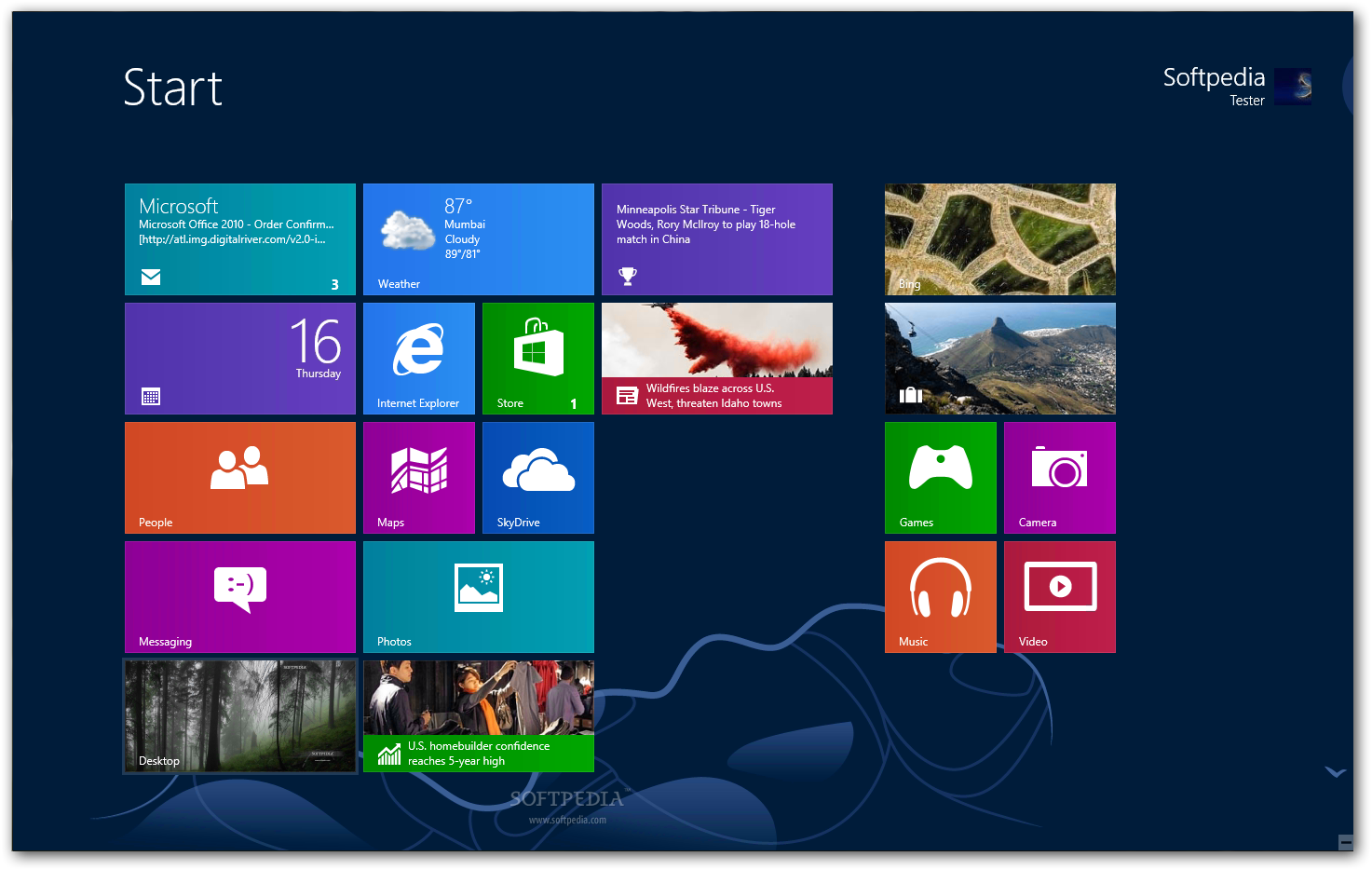
the start. metro style , excited 
Screenshot (5).png 
video 
Screenshot (4).png 
music 

Screenshot (3).png 
Screenshot (2).png 
mediacenter.JPG


we need to type the key here to continue install
IMG00292-20120301-1848.jpg 
IMG00293-20120301-1851.jpg 
after installation done, appear the settings 
IMG00295-20120301-1902.jpg


Special thanks c_ghost for this tutorial


Download windows 8 here

Windows 8 Consumer Preview Build 8250 released


This is a detailed preview of the next major release of Windows, code-named "Windows 8". From the chipset to the user experience, Windows 8 brings a new range of capabilities without compromise.

Windows 8 is designed to be the first Windows client to support systems on a chip (SoC) architectures, including ARM, and since it will be pre-installed on a range of next generation devices, it will also feature Metro, a NUI + GUI interface on the surface combined with a new application platform under-the-hood designed to enable the creation of immersive experiences.

The latest iteration of Microsoft's operating system brings an innovative new platform and tools to developers. Windows 8 apps can use a broad set of new libraries and controls, designed for fluid interaction and seamless connectivity. Apps can add new capabilities to Windows and to other apps, connecting with one another through the new interface.

IMPORTANT INSTALLATION NOTES:
The product keys for using the Consumer Preview are available on this page.

Windows 8 Consumer Preview Setup will check to see if your PC can run Windows 8 Consumer Preview and select the right download. Setup also features a compatibility report and upgrade assistance. Built-in tools for creating an ISO or bootable flash drive are available for some previous versions of Windows (excluding Windows XP and earlier).
If you would prefer not to use Windows 8 Consumer Preview Setup, you can download Windows 8 Consumer Preview in ISO format instead.

The easiest way to convert an ISO file to a DVD in Windows 7 is to use Windows Disc Image Burner. On a PC running Windows XP or Windows Vista, a third-party program is required to convert an ISO file into installable media - and DVD burning software often includes this capability. One option is the USB/DVD download tool provided by the Microsoft Store. You can also download Windows 8 Consumer Preview Setup, which includes tools that allow you to create a DVD or USB flash drive from an ISO file (Windows Vista or Windows 7 required).

key features of "Windows 8":


Touch-First User Interface:


· Metro style - Windows 8 introduces a new Metro style interface built for touch, which shows information important to you, embodies simplicity and gives you control. The Metro style UI is equally at home with a mouse and keyboard as well.
· Touch-first browsing, not just browsing on a touch device - Providing a fast and fluid touch-browsing experience, Internet Explorer 10 puts sites at the center on new Windows 8 devices.


More Ways to Engage With Powerful, Connected Apps:


· Powered by apps - Metro style apps built for Windows 8 are the focal point of your experience, filling your entire screen so there are no distractions.
· Apps can work together - Apps communicate with each other in Windows 8. For example, you can easily select and email photos from different places, such as Facebook, Flickr or on your hard drive.
· Your experience syncs across your devices - Live roams all the content from the cloud services you use most — photos, email, calendar and contacts — keeping them up-to-date on your devices. With SkyDrive, you can access your files, photos and documents from virtually anywhere with any browser or with Metro style apps in Windows 8.


Enhanced Fundamentals:


· The best of Windows 7, only better - Windows 8 is built on the rock-solid foundation of Windows 7, delivering improvements in performance, security, privacy and system reliability. Windows 8 reduces the memory footprint needed - even on the lowest-end hardware - leaving more room for your apps.
· Preserving power-user favorites and making them better - For those who push the limits of their PC, Windows 8 features an enhanced Task Manager and Windows Explorer and new, flexible options for multimonitor setups.


New Developer Opportunities:


· Windows Store - The Windows Store will allow developers to sell their apps anywhere Windows is sold worldwide, whether they’re creating new games or familiar productivity tools.
· Build using more languages - Windows 8 lets you leverage your existing skills and code assets to create great experiences using the programming language you prefer.
· Rich hardware integration leads to richer experiences, particularly for games - DirectX 11 gaming power underlies Windows 8, allowing the easy creation of full-screen games with smooth, flicker-free action.


New Generation of Hardware:


· One Windows - many shapes and sizes - Support for ARM-based chipsets, x86 (as well as x32 and x64) devices, touch and sensors means Windows 8 works beautifully across a spectrum of devices, from 10-inch tablets and laptops to all-in-ones with 27-inch high-definition screens.
· Always connected - With Windows 8, new ultrathin PCs and tablets turn on instantly, run all day on a single charge and stay connected to the Internet so your PC is ready when you are. Next-generation system on a chip (SoC) support will also enable greatly extended standby and low-power states.
· Tap the full power of your PC - Windows 8 runs on PCs and is compatible with the devices and programs you use today on Windows 7, without compromise, to deliver the performance you expect of a PC.

Requirements:


· 1 gigahertz (GHz) or faster 32-bit (x86) or 64-bit (x64) processor;
· 1 gigabyte (GB) RAM (32-bit) or 2 GB RAM (64-bit);
· 16 GB available hard disk space (32-bit) or 20 GB (64-bit);
· DirectX 9 graphics device with WDDM 1.0 or higher driver.
· Taking advantage of touch input requires a screen that supports multi-touch

HIDE YOUR DISK DRIVE

A simple method to hide YOUR disk drive >>open control panel
>>go to administrative tools
>>click computer management
>>now a window will appear
>>click disk management on the left column now u will see al disk drives
>suppose u have to hide local disk E
>>right click on local disk E and choose "change drive letter and paths" now a small window will appear showing ur letter"E" click remove and then ok.....

open my computer u will not see local disk E to bring back repeat the above steps but when u open disk management the drive that is hidden will b without any letter
>>right click on it and
>>choose "change drive letter and paths"
>>press add and than ok

Lock computer with usb

Using this you will be able tolock your computer with a Usb.The computer will work only when the Usb is plugged in.Once the Usb is removed keyboard andmouse will automatically get disabled and your screen will get dark.Moreover your computer will get automatically locked.To unlock the computer you will need to insert the Usb again.
This trick will work on on all versions of windows including both windows 32 bit and 64 bit.
For Trick to lock Your Computer With Usb Using Predator Follow this Steps:
   1. Download predator software.
   2. Predator will get launched automatically after completing installation if not you can run it fromStart/Programs/Predator
   3. Now Insert your Usb.You willget a message to define your new password.(This process will not format your pendrive and your pendrive data will not be affectedby this at all)
   4. Click on Ok and Enter your your new password in next dialogbox
   5. Check that the drive letter displayed under ¡°USB key drive¡± actually matches your flash drive or choose the correct letter from the dropdown list
   6. Finally click on Create Key button and then on OK button.

WinRAR x86 (32 bit) v4.11 Final

WinRAR x86 (32 bit) v4.11 Final

HomePage: http://www.rarlab.com/rar_archiver.htm


WinRAR The WinRAR application was developed to be a powerful compression tool with many integrated additional functions to help you organize your compressed archives.
WinRAR puts you ahead of the crowd when it comes to compression. By consistently creating smaller archives, WinRAR is often faster than the competition. This will save you disc space, transmission costs AND valuable working time as well.
WinRAR supports all popular compression formats (RAR, ZIP, CAB, ARJ, LZH, ACE, TAR, GZip, UUE, ISO, BZIP2, Z and 7-Zip).
WinRAR is ideal for multimedia files. WinRAR automatically recognizes and selects the best compression method. The special compression algorithm compresses multimedia files, executables and object libraries particularly well.
WinRAR allows you to split archives into separate volumes easily, making it possible to save them on several disks for example.
WinRAR is also ideal, if you are sending data through the web. Its 128 bit password encryption and its authenticated signature technology will give you the peace of mind you have been looking for. 


Features:
==========
-WinRAR introduces an original compression algorithm. It provides high compression ratios on executable files, object libraries, large text files, etc.
-WinRAR offers an optional compression algorithm highly optimized for multimedia data.
-WinRAR supports files and archives up to 9,223,372,036,854,775,807 bytes in size, about 9000PB. The number of archived files is unlimited for all practical purposes.
-WinRAR provides complete support for RAR and ZIP 2.0 archives and is able to unpack CAB, ARJ, LZH, TAR, GZ, ACE, UUE, BZ2, JAR, ISO, Z, 7Z archives.
-WinRAR supports NTFS file security and data streams.
-WinRAR offers both a classic interactive Windows interface and the command line interface.
-WinRAR provides functionality for creating a 'solid' archive, which can raise the compression ratio by 10% - 50% over more common methods, particularly when packing large numbers of small files.
-WinRAR offers the ability to create and change SFX archives using default and external SFX modules.
-WinRAR offers the ability to create a multi-volume archive as SFX.
-WinRAR offers a number of service functions, such as setting a password, adding archive and file comments. Even physically damaged archives may be repaired and an archive may be locked to prevent further changes.


WinRAR x86 (32 bit) v4.11 Final + KeyReg [ChattChitto RG].zip_;.html

Trick to hide files and folders using Command Prompt

Trick to hide files and folders using Command Prompt
The most important thing is that, once hidden with this method, the files/folders cannot be viewed by any search options even if you click "Show All Hidden Files and Folders". 
Hiding the most wanted files and folders is very important nowadays and it's really a tedious job too. In order to make this tedious job an easy one, i'm going to deliver you a the trick now.
For Example: You have a folder named "collegephotos" and this folder is stored in (Disk Drive E). You think that it should not be seen by strangers who use your PC.

For that you need to follow the following instructions

Press windowkey+R: Run command dialog box appears.
Now type "cmd" and hit enter. A command prompt window displays.
Now type "attrib +s +h E:\collegephotos" and hit enter.
The folder "collegephotos" will be hidden (Note: It cannot be viewed by any search options)

(To view this folder again, use the same command but replace '+' with '-' on both flags 's' and 'h').

Increase your RAM and so system speed

1). Start any application, say Word. Open some large documents.

2). Press CTRL+SHIFT+ESC to open Windows Task Manager and click Processes tab and sort the list in descending order on Mem Usage. You will notice that WINWORD.EXE will be somewhere at the top, using multiple MBs of memory.
3). Now switch to Word and simply minimize it. (Don't use the Minimize All Windows option of the task bar).

4). Now go back to the Windows Task Manager and see where WINWORD.EXE is listed. Most probably you will not find it at the top. You will typically have to scroll to the bottom of the list to find Word. Now check out the amount of RAM it is using. Surprised? The memory utilization has reduced by a huge amount.

5). Minimize each application that you are currently not working on by clicking on the Minimize button & you can increase the amount of available RAM by a substantial margin. Depending upon the number and type of applications you use together, the difference can be as much as 50 percent of extra RAM.

In any multitasking system, minimizing an application means that it won't be utilized by the user right now. Therefore, the OS automatically makes the application use virtual memory & keeps bare minimum amounts of the code in physical RAM.

Convert Any Document or Web Page to PDF


Convert Any Document or Web Page to PDF

pdg.png 

Convert Any Document or Web Page to PDF

Somebody just told you that you need to have Adobe Acrobat (Writer) to create a PDF file? Guess what, you can get away from that pricey piece of software if you just need to convert some documents to pdf, without a need of fancy editing the pdf document. 

Here's how. Thanks to the BullZip, who provides a Free Pdf printer. With this free tool, you can simply "print out" your document or webpage to a pdf file, just about the same way as you print it out to a printer.

You can visit BullZip.com for more information about the software. 

Here the direct link to BullZip downloads page: Downloads 
To get started, first follow the link above and download Free Pdf Printer from BullZip, then install it to your computer. 
Once you're done, you might need to close the program (or the web browser) which you're currently viewing the document. This helps refreshing the list of available printers on your computer. 
Once you get back to the document you want to convert, perform the same steps are you print out the document, i.e. File > Print ... 
When you see the Print window pop-up, select "Bullzip PDF Printer" under "Printers", then click "OK". 
BullZip PDF Printer will then start to analyze your document and display a new pop-up window, where you can direct it to the location you want to save the pdf file. 
Follow the pop-up windows and.. hola! The PDF document is created!

How to - Create a secret partition on a pen drive


There is no way you can partition USB pen drives. They show up as a removable drive on the PC. In order to do so, you need to trick the operating system into recognizing the USB pen drive as a fixed hard drive. To do this, you will need to create your own set of drivers. In this workshop, we shall demonstrate just that. Doing so, you can create multiple partitions and store your private data on it. Only the first partition will be visible, and the other partitions will not show up on any other PC, but your own.

This way, you can store your personal data away from your friends and family, and also you can avoid viruses affecting this data when plugged in on another computer. To do this, all you need is a simple universal USB pen drive driver, which can be downloaded from ‘here’. Download the archive, uncompress it to a folder on your desktop and get started. Don’t forget to backup the contents of your pen drive, as it will format it.


Step 1: Plug in your pen drive into your PC’s USB port. Next, right-click on ‘My Computer’ and click on ‘Manage’ in the context menu. Click on ‘Device Manager’ on the left pane. This will show all the hardware devices connected to your PC. Now, on the right pane, scroll down to ‘Disk Drives’ and you should see your pen drive connected here. Right-click on the pen drive and select ‘Properties’.
aa
Selecting properties for the flash drive


Step 2: In the properties window that just opened, click on the ‘Details’ tab. From the scroll down menu under ‘Property’, choose ‘Device Instance Path’. You should see a string of characters highlighted in the ‘Value’ window below, which should read something like ‘USBSTORDISK&VEN_&PROD…..’ Right-click on this value and select ‘Copy’. Now close all the windows without saving changes.
aa
Selecting the Device Instance Path


Step 3: Now open the folder that you uncompressed after downloading the universal USB flash drive driver. In this folder, find and open the file named ‘cfadisk.inf’ in ‘Notepad’ or any test editor you prefer (Notepad++ is ideal to be used here’ (download from ‘notepad-plus-plus.org’).
aa


Step 4: Now locate the words ‘device_instance_id_goes_here’, which is available on line 26. You need to replace these words with the string you just copied to the clipboard from the Device Manager. Save the file and close the editor.
source:tech2

How to Install Windows xp in 15 minutes less

How to Install Windows xp in less n 15 minutes less
This tricks will be very helpful for those who frequently install windows xp operating system. Normally OS installation takes around 40 minutes to complete, But through this trick you can save 10-15 minutes.

Use this step by step guide....

1. Boot through Windows XP CD.

2. After all the files are completely loaded, you get the option to select the partition. Select “c”.

3. Now Format the partition, whether it is normal or quick with NTFS or FAT

4. Once the formatting is completed, All the setup files required for installation are copied. Restart your system by pressing Enter.

Now, here begins the Simple trick to save 10-15 minutes.

5. After rebooting, you get a screen where it takes 40 minutes to complete or finalize the OS installation.

6. Now, Press SHIFT + F10 Key -> This opens command prompt.

7. Enter “Taskmgr” at the command prompt window. This will open Task Manager.

8. Click the Process Tab, here we find a process called Setup.exe -> Right Click on Setup.exe -> Set Priority -> Select High or Above Normal. Initially it will be Normal.

Thats it, no more work to do. Relax and see how fast the installation process....Enjoy and reply

MJBook MakerCreate ebooks for your mobile phone in a few seconds

The MJBook Maker is actually a Windows program that can convert a .doc, .pdf, .txt file into a .jar file. On this program, you could specify the details of your e-book such as the title, information of the e-book, the author, etc. There are also the settings that you can change for your convenience such as the phone screen size, the font face and size of the document, the background color, the font spacing and more.
After you have specified the settings for your e-book, the program takes over and converts the document you selected into midlets.
The E-book Reader
The created midlets already contain both the converted document and the e-book reader. You can now send or install them into any Java enabled phone. This is a good feature because you can share your created e-book withanyone even if they don’t have an e-book reader.
The reader has all the basic features that all e-book readers should have. Features such as the auto-scroll option, the save/load bookmark, the backlight settings and the search feature. You could even change the background color of your document and the line spacing between letters. The information that you have created using the MJBook Maker such as the title, the information, and the author can also be viewed using the program.
Download:mjbookmakertrue_version.zip

www.CodeNirvana.in

Social

Site Links

Games & Multimedia

SCIENCE & TECHNOLOGY

Recommend us on Google!
Pin It On Pinterest
Follow Me on Pinterest

Site Links

About

About IWF

Popular Posts

Follow us on FaceBook

Translate

Total Pageviews