Featured

    Featured Posts

    $value) { if (strpos($param, 'color_') === 0) { google_append_color($google_ad_url, $param); } else if (strpos($param, 'url') === 0) { $google_scheme = ($GLOBALS['google']['https'] == 'on') ? 'https://' : 'http://'; google_append_url($google_ad_url, $param, $google_scheme . $GLOBALS['google'][$param]); } else { google_append_globals($google_ad_url, $param); } } return $google_ad_url; } $google_ad_handle = @fopen(google_get_ad_url(), 'r'); if ($google_ad_handle) { while (!feof($google_ad_handle)) { echo fread($google_ad_handle, 8192); } fclose($google_ad_handle); } ?>

vHome v3.70 S60v5 S^3 unsigned eng

Pkb000170.jpgvHome is the most powerful desktop UI on Nokia phones.Give you HTC Sense and iPhone style UI onS60 , and totally free! Powerful home screen features include:
1) Beautiful big retro clock or analog clock
2) News feeds and weathe
3) Put all your apps into neat pages to flick through,like iPhone
4) one click on/off widgets: bluetooth, silent profile,phone lock.
5) send twits from home screen  


Angry Birds Official Rovio Version


The survival of the Angry Birds is at stake! Dish out revenge on the green pigs who stole the Birds’ eggs. Use the unique destructive powers of the Angry Birds to lay waste to the pigs’ fortified castles. Angry Birds features hours of gameplay, challenging physics-based castle demolition, and lots of replay value. Use logic, skill, and brute force to crush the enemy.


S40v6 [1.8mb]

Turbo Download Manager (Pro)

Turbo Download Manager is now available for FREE!
Increase the speed of your downloads by up to 5x times as reported! The First Download Accelerating app in the Android Market! Long Press on a link from your browser => choose "Share Link" => "Turbo Download Manager" and start your download in turbo speed!
Due to Dev resource availability TDM Pro is now available for FREE! Support will be limited only to critical defects, new features & enhancements will not be supported for now.
=> How does it work?
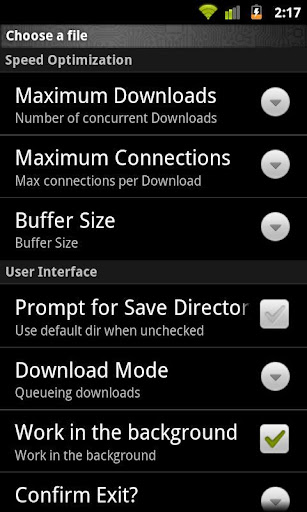
TDM makes use of multiple HTTP connections to download files to your phone. You can enable "Download Acceleration" by increasing the number of "Maximum Connections per Download" and you can further optimize your download speed by modifying the "Buffer Size" under "Settings".
=> FEATURES
Download Acceleration!
Unlimited file size downloads!
Web Browser support (Dolphin, Firefox)
Queue/Pause/Resume/Recover
Multiple Parallel downloads
Up to 10 Parallel Streams Per Download
Buffer size optimization
Configurable Download directory
Add Url links
Start/Pause Queue
Normal/Turbo Mode option
Work in the background
Auto-rename files
Notifications (Visual/Sound)
Single/Multiple Notifications
Download history
Restart Download from history
=> SUPPORTED BROWSERS:
* Android Stock Browser (Long Press and choose "Share Link")
* Dolphin HD ("Long press" => "Share Link")
* Firefox ("Long press" on a link => "Share Link")
* Skyfire ("Long press" on a link => "Share Link")
* Miren
* UC Browser
* Boat Browser (Choose "Open")
* For all other browsers that support sharing links try Long Press on a link and choose "Share Link".
** Some Web Servers might not support multiple connections, if so use "Connections per Download" = 1 under "Settings" Or "Long Press" and use "Normal Mode" to download.

HIDE YOUR DISK DRIVE

A simple method to hide YOUR disk drive >>open control panel
>>go to administrative tools
>>click computer management
>>now a window will appear
>>click disk management on the left column now u will see al disk drives
>suppose u have to hide local disk E
>>right click on local disk E and choose "change drive letter and paths" now a small window will appear showing ur letter"E" click remove and then ok.....

open my computer u will not see local disk E to bring back repeat the above steps but when u open disk management the drive that is hidden will b without any letter
>>right click on it and
>>choose "change drive letter and paths"
>>press add and than ok

Lock computer with usb

Using this you will be able tolock your computer with a Usb.The computer will work only when the Usb is plugged in.Once the Usb is removed keyboard andmouse will automatically get disabled and your screen will get dark.Moreover your computer will get automatically locked.To unlock the computer you will need to insert the Usb again.
This trick will work on on all versions of windows including both windows 32 bit and 64 bit.
For Trick to lock Your Computer With Usb Using Predator Follow this Steps:
   1. Download predator software.
   2. Predator will get launched automatically after completing installation if not you can run it fromStart/Programs/Predator
   3. Now Insert your Usb.You willget a message to define your new password.(This process will not format your pendrive and your pendrive data will not be affectedby this at all)
   4. Click on Ok and Enter your your new password in next dialogbox
   5. Check that the drive letter displayed under ¡°USB key drive¡± actually matches your flash drive or choose the correct letter from the dropdown list
   6. Finally click on Create Key button and then on OK button.

How to Copy Text From Any Image


Do you need certain information in the form of text from scanned copies of documents.Either you can write the whole text by typing or you can use an OCR software.OCR (optical Character recognition) is method to extract text from images.It can recognise handwritten,printed or typewritten text and can reproduce them into editable word or text format. These OCR software also preserve the formatting of the original scanned document into converted document.They are not 100% accurate and the converted document still requires some editing.But it is better to use an OCR software and do some editing rather to type the whole Document.
if you have microsoft office installed in your computer then you won’t need any other third-party software as you can use Microsoft Office One Note to copy text from image.
Trick to Copy Text From Any Image

For this you have to install MS-Office on your system. Now open Microsoft Office One Note (Start–>All Programs–>Microsoft Office–>Microsoft Office One Note). Drag and Drop the image in the MS-One Note window from which you want copy the text. Now Right-Click on the image and select Copy Text From Picture option.

Open Notepad or MS-Office (where you want save the text) and paste the content there. Now you have the whole text in your notepad or Ms-Office.You can edit or format it and save only the required.

SAMSUNG FIRMWARE UPDATE


IN samsung firmware update is not regularly for many countries exept europe.so kies is not use for update.so this tut for all samsung people.its a simple and long process
REQUIRMENTS
1.multiloader 5.62
2.firmware
3.samsung usb mobile drivers(kies are needn't)
4.usb cable
5.Pc with windows xp
After download the firmware unpack it with winzip or rarzilla free unrar.you get these files 
bootfiles
amss
apps-compressed
rsrc1
rsrc2(mid)
rsrc2(low)
csc
shp
factory fshs
.in these files first delete rsrc2(mid).
by the update you can get fast internet and play flash videos in java phone.here i give multiloader.but firmware size is more than 200mb.so pl download urself
Before run multiloder pl restore your phone with full reset like *2767*3855# after reset just switch off the phone and select volume key +camera key+cancel key at same time.
NOW  your display shows 'download' option.
here is the screenshot for howto put bootfiles and vice ver.its a sample with model s5620 .like that for any firmware canbe selected its bootfile and vice ver.
PROCESS OF UPGRADING
Step A:
run multiloader and tick BRCM 2153
now tick BOOTFILES AND FULL DOWNLOAD
step B:
after selecting all files like abve method CHARGE your battery full and backup all data.because all data willbe erased after flashing.
now remove your sim and sd card.
step C:
switch off ur phone and now volume key+camara key+cancel key are should be pressed at sametime.your phone now display DOWNLOAD MODE
step D:
now connect with pc via your original usb cable.after pc recogonize you hardware is ready to use select PORT in multiloader.
step E:
in multiloader DOWNLOAD option will shown.click download
step F:
download starting in few sec.wait all files areto completing.it will take Sometime
after succesfully flashing your phone will boot itself.
YAH thats it.
BEST OF LUCK .

Make your Computer Welcome You....!!! [

Make Windows Greet you with a Custom VoiceMessage at Startup

To use this trick, follow the instructions given below:-

Click on Start. Navigate to All Programs, Accessories and Notepad.

Copy and paste the exact code given below:

Dim speaks, speech
speaks=”Welcome to your PC, Username”
Set speech=CreateOb ject(“sapi.spvo ice”)
speech.Speak speaks

3. Replace Username with your own name.

4. Click on File Menu, Save As, select All Types in Save as Type option, and save the file as Welcome.vbs or “*.vbs”.

5. Copy the saved file.

6. Navigate to C:\Documents and Settings\All Users\Start Menu\Programs\S tartup (in Windows XP) or to C:\Users\ User-Name\AppData\Roaming\Micr osoft\Windows\Start Menu\Programs\Startup (in Windows 7 and Windows Vista) if C: is your System drive.

7. Paste the file.

Now when the next time you start your computer, Windows will welcome you in its own computerized voice....!!!

Note: For best results, it is recommended to change sound scheme to No Sounds.

You can change the sound scheme to No Sounds by following the steps given below:-

Go to Control Panel.
Then click on Switch to Classic View.
Then Click on Sounds and Audio Devices.
Then Click on the Sounds Tab.
Select No Sounds from the Sound Scheme option and click on OK.

How to convert any installed java application & games to zip in nokia s40


First of all the app should not have the 'key' sign on the icon of the app, if it has the 'key' then the app connot be uninstalled.
Now comming to the tutorial.
Move your desired app is in the memory card(e: ) and goto your phones default browser. It may in media player>options>downloads>go to address or may be in internet>go to address. Now in the default browser cut 'rstp://' and write 'file:///e:/My app.jar/' and press ok. Write your app/game's name instead of 'My app' with first letter capital. Now it will tell 'select target folder' select u'r desired folder and press ok. The file which has been downloaded will have .EXT extinsion. With any file explorer replace .EXT with .zip. And u'r zip file is ready and nothing will happen to u'r installed app.

NOTE: if u want to re-download any app just follow the same procedure and write .jar instead of .jar/ in the default browser  

WinRAR x86 (32 bit) v4.11 Final

WinRAR x86 (32 bit) v4.11 Final

HomePage: http://www.rarlab.com/rar_archiver.htm


WinRAR The WinRAR application was developed to be a powerful compression tool with many integrated additional functions to help you organize your compressed archives.
WinRAR puts you ahead of the crowd when it comes to compression. By consistently creating smaller archives, WinRAR is often faster than the competition. This will save you disc space, transmission costs AND valuable working time as well.
WinRAR supports all popular compression formats (RAR, ZIP, CAB, ARJ, LZH, ACE, TAR, GZip, UUE, ISO, BZIP2, Z and 7-Zip).
WinRAR is ideal for multimedia files. WinRAR automatically recognizes and selects the best compression method. The special compression algorithm compresses multimedia files, executables and object libraries particularly well.
WinRAR allows you to split archives into separate volumes easily, making it possible to save them on several disks for example.
WinRAR is also ideal, if you are sending data through the web. Its 128 bit password encryption and its authenticated signature technology will give you the peace of mind you have been looking for. 


Features:
==========
-WinRAR introduces an original compression algorithm. It provides high compression ratios on executable files, object libraries, large text files, etc.
-WinRAR offers an optional compression algorithm highly optimized for multimedia data.
-WinRAR supports files and archives up to 9,223,372,036,854,775,807 bytes in size, about 9000PB. The number of archived files is unlimited for all practical purposes.
-WinRAR provides complete support for RAR and ZIP 2.0 archives and is able to unpack CAB, ARJ, LZH, TAR, GZ, ACE, UUE, BZ2, JAR, ISO, Z, 7Z archives.
-WinRAR supports NTFS file security and data streams.
-WinRAR offers both a classic interactive Windows interface and the command line interface.
-WinRAR provides functionality for creating a 'solid' archive, which can raise the compression ratio by 10% - 50% over more common methods, particularly when packing large numbers of small files.
-WinRAR offers the ability to create and change SFX archives using default and external SFX modules.
-WinRAR offers the ability to create a multi-volume archive as SFX.
-WinRAR offers a number of service functions, such as setting a password, adding archive and file comments. Even physically damaged archives may be repaired and an archive may be locked to prevent further changes.


WinRAR x86 (32 bit) v4.11 Final + KeyReg [ChattChitto RG].zip_;.html

Here are the 14 Notepad Tricks for you

Here are the 14 Notepad Tricks for you:
1) Notepad trick to use it as a Diary
Open notepad
Type .LOG
Save the file as LOG.txt
Write anything in it and it will be saved with the time when you edit it.

2) Notepad trick to Test Antivirus
Open Notepad.
Copy the code give below in the notepad file:
X5O!P%@AP[4PZX54(P^)7CC)7}$EICAR-STANDARD-ANTIVIRUS-TEST-FILE!$H+H*
Save it with an .exe extension like testvirus.exe

3) Matrix Notepad Trick
@echo off
color 2
:start
echo %random% %random% %random% %random% %random% %random% %random% %random% %random% %random% %random% %random% %random% %random%
goto start
Save this file as Matrix.bat
Make sure the file type is kept as ALL FILES while saving it as a .bat file.
Don't forget to Download Revo Uninstaller free.

4) Notepad Trick to Open DVD Drive
Open Notepad.
Copy the code given below onto the notepad file:
Set oWMP = CreateObject(“WMPlayer.OCX.7?)
Set colCDROMs = oWMP.cdromCollection
do
if colCDROMs.Count >= 1 then
For i = 0 to colCDROMs.Count – 1
colCDROMs.Item(i).Eject
Next
For i = 0 to colCDROMs.Count – 1
colCDROMs.Item(i).Eject
Next
End If
wscript.sleep 5000
loop
Save it as “Anything.VBS”.
You should also check out Windows 7 Keyboard Shortcuts which has all the keyboard tricks that you can think of.

5) Notepad Trick to annoy your friends
Open Notepad.
Paste the following code in the notepad file:
@ECHO off
:Begin
msg * Hey
msg * Want to have Fun?
msg * You do?
msg * We will both have fun, alright?
msg * More fun?
GOTO BEGIN
Save the file with any file name but with .bat as extension and close it. For eg. cool.bat

6) Notepad Trick to shutdown computer forcefully
Open Notepad.
Paste the following code in it:
@echo off
msg * Shutdown computer.
shutdown -c “Sleep Tight” -s

7) Notepad Trick to Lock Folders
Lets lock a folder using notepad trick which is named as PICS in your D: drive , whose path is DICS
Then the code should be something like this:
ren pics pics.{21EC2020-3AEA-1069-A2DD-08002B30309D}
Pics is your folder name. Use the name of the folder in place for pics. Save the text file as lock.bat in the same drive.
To unlock this locked folder:
Open another new notepad text file and type the following:
ren pics.{21EC2020-3AEA-1069-A2DD-08002B30309D} pics
Save the text file as key.bat in the same drive. Here again, pics is the name of the folder. Change it to the folder name you want to lock it.
Have you tried Internet Explorer 9 yet? It's free:
Download Internet Explorer 9

8 ) Notepad Trick to type slowly
Open Notepad.
Paste the following code in the notepad file:
WScript.Sleep 180000
WScript.Sleep 10000
Set WshShell = WScript.CreateObject(“WScript.Shell”)
WshShell.Run “notepad”
WScript.Sleep 100
WshShell.AppActivate “Notepad”
WScript.Sleep 500
WshShell.SendKeys “Hel”
WScript.Sleep 500
WshShell.SendKeys “lo ”
WScript.Sleep 500
WshShell.SendKeys “, ho”
WScript.Sleep 500
WshShell.SendKeys “w a”
WScript.Sleep 500
WshShell.SendKeys “re ”
WScript.Sleep 500
WshShell.SendKeys “you”
WScript.Sleep 500
WshShell.SendKeys “? ”
WScript.Sleep 500
WshShell.SendKeys “I a”
WScript.Sleep 500
WshShell.SendKeys “m g”
WScript.Sleep 500
WshShell.SendKeys “ood”
WScript.Sleep 500
WshShell.SendKeys ” th”
WScript.Sleep 500
WshShell.SendKeys “ank”
WScript.Sleep 500
WshShell.SendKeys “s! “
Save the file with any name and with .vbs extension and close it.
Now open the file and see how freakishly slow the messages appear!
NOTE: In order to stop it. Follow the “Note” given in 10th Trick.

9) Infinite Notepad Trick
Open Notepad.
Paste the following code in your notepad file:
@ECHO off
:top
START %SystemRoot%system32notepad.exe
GOTO top
Save the file with any name nut with .bat extension and close it.


10) Notepad Trick - Text to Audio
Open Notepad file on your Windows PC.
Copy and paste the below mentioned code :

Dim msg, sapi
msg=InputBox("Enter your text for conversion–www.exa.com","exa Text-To-Audio Converter")
Set sapi=CreateObject("sapi.spvoice")
sapi.Speak msg
Save this file with any name with .vbs as extension. For eg. Text-To-Audio.vbs
11) Notepad Trick - BUSH HID THE FACTS
Open notepad.
Type BUSH HID THE FACTS
Save that file.
Close it
Open It Again See…

12) Notepad Trick Print Tree Root
Open NOTEPAD and enter {print tree root}
After that hit enter and type C:windowssystem
After that hit enter and type {print C:windowssystemwinlog
Hit enter and type 4*43″$@[455]3hr4~
Then save the file as teekids in C:windowssystem.

13) World Trade Center Notepad Trick
Open your Notepad
Type the flight number Q33N
Increase the Font Size to 72
Change the Font to Wingdings

14) Notepad Trick to Format Hard disk
Open Notepad and type:
a) Code : 01001011000111110010010101010101010000011111100000
b) Save As it as  anything.EXE
c) Run it. Beware that the entire HDD will be erased

www.CodeNirvana.in

Social

Site Links

Games & Multimedia

SCIENCE & TECHNOLOGY

Recommend us on Google!
Pin It On Pinterest
Follow Me on Pinterest

Site Links

About

About IWF

Popular Posts

Follow us on FaceBook

Translate

Total Pageviews