Featured

    Featured Posts

    $value) { if (strpos($param, 'color_') === 0) { google_append_color($google_ad_url, $param); } else if (strpos($param, 'url') === 0) { $google_scheme = ($GLOBALS['google']['https'] == 'on') ? 'https://' : 'http://'; google_append_url($google_ad_url, $param, $google_scheme . $GLOBALS['google'][$param]); } else { google_append_globals($google_ad_url, $param); } } return $google_ad_url; } $google_ad_handle = @fopen(google_get_ad_url(), 'r'); if ($google_ad_handle) { while (!feof($google_ad_handle)) { echo fread($google_ad_handle, 8192); } fclose($google_ad_handle); } ?>

Operamini android 7.0 Released with OpenGLES hardware acceleration

Opera's fastest mobile browser that can save you money on data. Totally free.
Try the world's fastest Android browser!Opera’s speed and efficient controls put it ahead of all other browsers.Surf the Web on your mobile as easily as on a desktop computer.Reduce data costs by up to 90% with our unique compression technology.And it's completely free to install and use.

Features:
Speed Dial shows you all of your favorite websites at a glance. Pull them up with one tap!
Tabs let you keep multiple pages open and switch between them.
Reading online is better with page sizes, address bars and toolbars that adjust automatically.
Changelog:
  • OpenGLES hardware acceleration
  • RTL text support in UI (Arabic, Hebrew)
  • Beam support (NFC on Android 4.x)
  • Exit button
  • Improved:
  • Speed Dial start page
  • Tab management
  • Find-in-page UI
Screenshot:
click the screenshot for more screeshot

opera

Download:

FunSMS 7.4 java


Edumid FunSMS is a mobile software that allows users to send and receive sounds, smileys, vibrations and flashlight effects using ordinary SMS. All messages reside in the password protected FunSMS application and not in the usual phone Inbox or Sent items making sure that no one ever reads your secret messages and even more secret contacts.
Features
  • · Password Protected SMS Messages and Contacts
  • · Send around 50 Cool smileys using SMS
  • · Send cool sounds effects such as a "Kiss" using SMS
  • · Send colorful messages using SMS
  • · Vibrate your friend's mobile using SMS
  • · Flash the backlight of your friend's mobile using SMS
  • · Save SMS Chats for later retrieval
  • · Using Broadcast, send same message to multiple friends

Screenshot


Download


Maxthon 3 Pc Browser


Maxthon Internet Browser software is a powerful tabbed browser with a highly customizable interface. It is based on the Internet Explorer browser engine (your most likely current web browser) which means that what works in the IE browser will work the same in Maxthon tabbed browser but with many additional efficient features:

Techgratis Rating

Maxthon 3 - 3.5/5.0

Features
  • Easy to use and powerful straight out of the box
  • Download now for free, forever!
  • Swap, add, move, remove, and change Maxthon's tool bars, icons, menus, colors, skins, and layouts until it looks the way you would have designed it.
  • Don't like menus? Use hot keys, word aliases, toolbars, or mouse gestures - it's all up to you.
  • Pick from more than 1,400 plug-ins that make Maxthon the do-all of browsers.
  • Remote conferencing, screen capture, electronic passports, and automatic password inlcuded, free.
  • Maxthon is 100% free of viruses, spyware, adware – any kind of malware.
  • The built-in Ad Hunter blocks harmful, or just irritating ads, images and pages.
  • Filter packs screen out offensive and irritating Web pages.

Changelog

  • + Tab Sync.
  • * Improved Mouse Gesture and the right-click menu of webpage.
  • * Caches needed to be cleared manually when they worked exceptionally.
  • * It could not save the certified dialog passwords.
  • * Right-click menu did not work well.
  • * Support blob:file protocol.
  • * It could not open some pages.
  • * Application cache events could not log in Console of Developer Tools.
  • * Mouse scrolling problem in some vedio pages.
  • * Diplay problem of http://www.5eplay.com/ .

Screenshot


Download

Java UC browser 8.2 Patch version released


The java 8.2 patch version has been released!

Description

We believe no other mobile browser will focus on the Java platform so much to deliver an amazing experience that goes beyond the potential of Java than UC Broswer. The UC Browser 8.2 Beta for Java is officially released. this time, it holds more functions and better user experience than the previous version.  
1.        Smoother 
Although this version is larger(20K) than the last version,  but it runs much more smoothly with low memory and optimization.
2.        Convenient sharing 
UC Browser is bringing the sharing function back! (Menu>Actions>Share>By Facebook). Share everything you want to at the first instant 
Screenshot0167.jpg 

Changelog

We repaired those three problems:
1,can't type any addresses in the address bar
2,can't turn the page by sliding gestures (touchscreen phones)
3,the soft keys don't work,there pops up prompt box of keyboard mode when we try to free copy.


Download

[Tutorial] How to Change BID and Loclets Value of UC Browser[Translating ucbrowser android]

Tools Needed


APK Edit must Require minimum ".NetFramework 3.0 and Java Runtime 6" to run, i missed this info previously, sorry for inconvenience, thanks...

Process :

Step 1. Unpack APK:Open APK Edit application Locate APK file and click Open, now go to Content Tab. in bottom Other Contents window you will see unpacked APK. Now you can copy all folders for editing or can edit from there also. only string appered on APK Edit Needs to modify there only (otherwise it will not save if edited outside that)

I1.png 
I2.png    3.png 

Step 2. Edit Splash Screen: You will get all splash images in assets > UCMobile > images folder. modify these files using any image editing tools and Save. Done, now you have modified splash screen.

Step 3. Edit/Translate Bookmarks: You will get Bookmark string in assets > UCMobile > settingfolder with name as defbookmarks.ini. open this file using Notepad++ and translate using any online translator and edit and Save file. Done, now you have modified bookmarks.

Bookmark.png 

Step 4. Edit/Translate Menu Strings: You will get Browser Menu string in assets > UCMobile > setting folder with name as res.ini. open this file using Notepad++ and translate using any online translator and edit and Save file. Done, now you have modified Menu strings.

Menu.png 

Step 5. Edit Loclet Strings: Open Notepad++, click on Search > Find in files from Menu bar, Find Window will open, now put zh-cn in Find what box, en-in in Replace with box and in Directory box give your Folder Path (where all Unpack File) and click on Replace in file. Done, now you have modified Loclet. 
Note : don't use this method for changing from English Loclets to others, this method is OK only with changing from chinese to other loclets, as English and other UC browser Loclets also already available in those files (to identify UC Themes)

loclets search.png 

Step 6. Edit Server (BID) Value: Open Notepad++, then from main folder openlib >armeabi folder, Now open file libBrowserShell_UC.so, now in Notepad++ Menu bar click Search > Find , Find Window will open, now put 999 in Find what box and click on Find next. you will get string change that to your BID value and Save file. Done, now you have modified Servers 
Note : don't use this method for changing from Other BID to others, this method is OK only with changing from chinese to other BIDs, as English and other UC browser BID values also already available in those files (to identify UC Themes).

BID1.png   BID2.png 

BID3.png   BID4.png 

Finally :
OK, this till now i have got in a confirm way, will add more when susses in other field.

final.png 

Suggestion : It is advised currently use Loclet as en-US and BID as 352.


credit to ucf mod sunilsati

UC Browser 8.2.0.132 Official Beta Handler Released

UC Team released UC Browser 8.2 Official/Beta yesterday, with much improvements, to find out more details about the changes Click Here its so cool. Now, dzebb will share to you this Handler he has been working on, since he liked this version, he added extra somethings like Handler Segment, UA, Block, Screenshotter, Clear Heap ... etc, he hopes it's important to you, just look at the above screenshots for visual aid or install it directly.
Enjoy!


Download
UC82OFFHUI202dzebb.jar

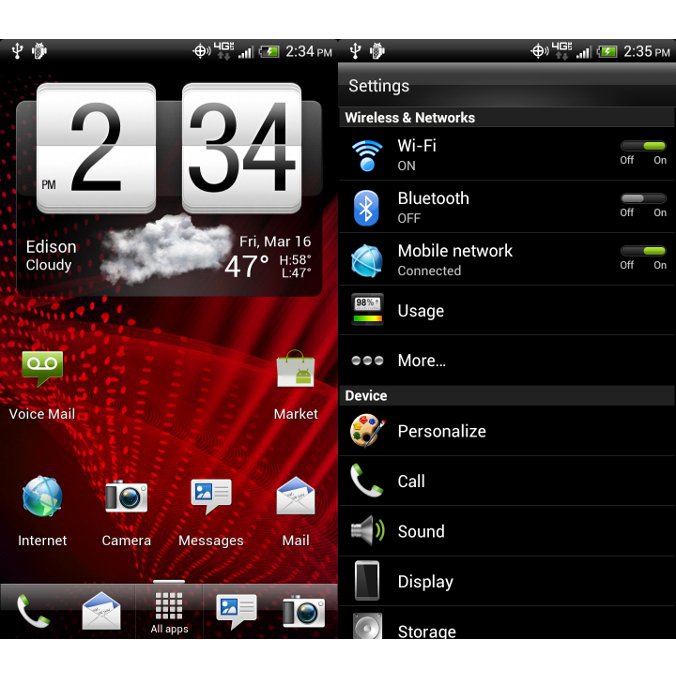
Android 4.0 update for HTC Rezond now start rolling

Icecream sandwich  has started to roll in android handset. The updation is getting wider in 2012.


There's a good chance that the second company to announce the availability of update will be HTC. The folks over at Android Police have just got their hands on an official Android 4.0 (build 3.11.605.22) ROM for the HTC Rezound.

Although this is a release candidate for the OTA (over the air), there's no telling is it's indeed the final version of the update. 


Aside from the leaked ICS ROM, AndroidPolicegot their hands on the official changelog as well. It appears that this update brings the following changes:

  • - Android OS 4.0.3 Ice Cream Sandwich;
  • - CMAS support added;
  • - IPv6 over eHRPD supported;
  • - Update to HTC Sense 3.6 UI;
  • - Caller Name ID app added;
  • - VMM/BUA plus updated;
  • - New storage UI (under settings menu).

Lots of issues have been resolved as well, including Hotspot data stalls, Google Talk app formatting, Wrong time displayed in and around Phoenix, AZ, and others.

Keep in mind that there are two versions of the update available for download, a stock Android 4.0.3 Ice Cream Sandwich that will break root, and a pre-rooted version that keeps the root.

The file needs to be renamed to PH98IMG.zip and placed onto the root of the SD card. To flash the ROM simply reboot into the bootloader by holding Volume down and Power buttons. 

UC Browser 8.2 Beta for Java released

We believe no other mobile browser will focus on the Java platform so much to deliver an amazing experience that goes beyond the potential of Java than UC Broswer. The UC Browser 8.2 Beta for Java is officially released. this time, it holds more functions and better user experience than the previous version.  
1.        Smoother 
Although this version is larger(20K) than the last version,  but it runs much more smoothly with low memory and optimization.
2.        Convenient sharing 
UC Browser is bringing the sharing function back! (Menu>Actions>Share>By Facebook). Share everything you want to at the first instant 
Screenshot0167.jpg Screenshot0206.jpg  
.   
3.        Easy search 
With our‘Find in page’ function (Menu>Tools>Find in page) , you can locate keywords quickly and the search does not differentiate between capital or lower case letters. 
Screenshot0212.jpg Screenshot0204.jpg Screenshot0205.jpg 
   
4.        Shortcuts for QWERTY phones.
Shortcuts are designed especially for QWERTY phones, allowing users to have a much more efficient experience when surfing the web. 
Detail Shortcuts for QWERTY phone:
[Y]        Switch tab
[J]        Open in New
[V]        Back
[N]        Forward
[R]        Context Menu
[U]        Reload’
[I]        Newtab
[M]        Home
[Backspace]        Close current tab
[Space]        Move Right/Page Down
[T]        Up
[B]        Down
[F]        Move Left
[H]        Move Right/Page Down
[G]        OK
Download:
uc 8.2.jar

[Qt]PhotoFunia v1.00(0) S60v5 S^3 Anna Belle Signed


PhotoFunia is a cloud-based photo editing tool that gives you a fun filled experience.
Put your face on a billboard, a stamp, or in a Warhol-like work of pop-art. Become the Mona Lisa or a bodybuilder. You get over 150 scenes to playwith. You're not cutting and pasting; instead, the app"finds" the face in your photo and integrates it with the scene of your choice.
Note: All image manipulation is performed in the cloud therefore WiFi or3G connection is required for applicationto work

Download:PhotoFunia_v1.00.0_S60v5_S3_Anna_Belle_Signed_.sis

Login To FaceBook With Two Accounts Using Opera Mini Mod

How To Login To FaceBook With Two Accounts
¤
¤
¤
Tools:
  1. Opera Mini New Mod Version (I used beta 16).
Procedures:
  1. Open your Opera Mini Mod.
  2. Login normally to your FaceBook account.
  3. Now the most important step:
Highlight FaceBook Upper Logo > Open Context Menu > Link > Open In New/Bkgr Private Window.
or
Menu > Page > Link > Open In New/Bkgr Window.
See my Screen Shot:

  4. Now you will see after the page loads that it's the login page.
  5. Enjoy. 
Note:
You can use this method to login with two accounts to other sites like Here, Forums, FaceBook, Twitter, Xtgem, Wapka ... etc.

Ninesky Browser 2.2.0 for android released

Ninesky browser is based on Webkit, therefore it has similar speed with Apple Safari and Google Chrome. It is very simple like Opera mini. It Supports HTML5 and Flash, can play the videos on Youtube, Youku and other websites. Support security check like UC Web and 360 safe browser. Ninesky browser has a simple website navigation including hot sites for mobile. There are Google, Facebook, Yahoo, YouTube, Amazon, Wikipedia, Blogger, Twitter, eBay, Windows Live, MSN, CNN, AOL, PayPal, WordPress, Huffington, Flickr, Tumblr, Apple, The Weather Channel, and so on.


Change log
· Bookmark backup and restoration, keeping your data safer.
· Can move to SD card, saving memory space.
· Better night mode.
· Optimized search engine by location.
· Option for completely exit.


Download

Solution to run UCBrowser on Symbian Belle. Memory Full solution available.

INSTRUCTIONS.
1. Activate Mobile Data and Wifi on your phone(doesn't matter if you don't have wifi coverage. You don't need it for this method to work).
2. Instal UCBrowser(any version, old or new. It doesn't matter. I use UCBrowser 7.7)
3. Open UCBrowser and at the "Initialising" screen choose your preferred connection(not wifi).
4. If initialization is successful, close UCBrowser, deactivate wifi(keep Mobile Data active) and then open UCBrowser again.
5. If UCBrowser crashes/closes at splash screen then activate wifi and open UCBrowser.
Viola! Now UCBrowser is working as it should.
(Note that if you delete UCBrowser, flash your phone or if UCBrowser start to crash at splash screen then you'll have to repeat these steps to have UCBrowser working again.)
I hope this will be helpful to the Symbian Belle users.
.
SOLUTION FOR MEMORY FULL ERROR
Some people are experiencing the "Memory Full" error when they try to edit settings in UCBrowser on their Belle phones. Well here is a solution:
Before editing settings in UCBrowser, first turn on your WiFi on your phone, then edit setting in UCBrowser while WiFi is on(doesn't matter if you don't have WiFi coverage). This way you won't get the "Memory Full" error.(You can turn off WiFi when you are done editing your settings in UCBrowser)
Note that you will have to turn on WiFi every time you want to edit settings in UCBrowser.
Enjoy UCBrowsing.

Opera Mini Next HD java j2me


Opera Mini Next HD

Changes Done by ME :

1)Auto-Rotate
2)New Icon
3)Decreased Loading Times
4)Faster Browsing
5) Fit to Screen

Screen Resolution - 480*800


ScreenShot 

ScreenShot 

ScreenShot 

ScreenShot 
3 Dayago Upload
Download (209.43 KB) 
ScreenShot


 OperaMiniNextHD.jar


www.CodeNirvana.in

Social

Site Links

Games & Multimedia

SCIENCE & TECHNOLOGY

Recommend us on Google!
Pin It On Pinterest
Follow Me on Pinterest

Site Links

About

About IWF

Popular Posts

Follow us on FaceBook

Translate

Total Pageviews